
How to Make a Graphic Design Portfolio for Free in 2027
Starting as a graphic designer can be difficult, especially when you have no portfolio to show potential clients. You might have good designs, but without a place to showcase them, getting noticed becomes harder. The good news is that creating a portfolio doesn't have to be expensive. You can build one for free or at a very low cost in 2027 using platforms that let you upload your work, customize its appearance, and share it with anyone.
Depending on how you want to present your work, attract potential clients, and customize your portfolio, you can choose from several platforms that graphic designers commonly use to showcase their designs online:
- Behance
- Dribbble
- GitHub Pages
- Folioary
- Framer
- Wix
1. Behance
Behance is still the first place many graphic designers go when they want a portfolio for free. It is more of a social network from Adobe than a portfolio website of your own. On Behance, you make a profile, post design projects, and let other people view them, follow you, and leave appreciations and comments. Many designers start here because clients, art directors, and companies already search Behance every day, so your work can be found even before you send anyone a link. A free Adobe account gives you a public page at behance.net/yourname, which works fine on a CV or job application, and there is no limit on how many projects you can post. You can also mark yourself as open for freelance work, check the job board, or sell design files, though Behance takes a fee on paid jobs and file sales made through the site, and the free plan does not include your own web address. If you want your own site later, Behance Pro is a separate paid plan, listed by Adobe from $9.99 a month when you pay for the year, and the price can change by country. Pro drops those fees, adds link-only or password-locked projects and better view stats, and includes Adobe Portfolio, which lets you make up to five real websites with your own web address. Because Behance is a social network first, you use its standard profile layout instead of building your own page, which makes it a great free place to get seen and share full projects before you ever need a website of your own.
2. Dribbble
Dribbble is the other big social site graphic designers open when they want eyes on their work. Just like Behance, it is more of a creative network and hiring platform than a portfolio website of your own. Instead of long step-by-step write-ups, Dribbble is built around Shots, which are quick visual posts that usually show one clear image or short clip so people get the idea in a second. That format works really well for logos, posters, icons, illustrations, and UI screens, and it makes your profile easy for busy clients and recruiters to scan. With a free account, you get a public page at dribbble.com/yourname where you can publish Shots with a daily upload cap, organize work into boards, and get likes and saves from the community. The Lite plan starts at $4 a month when you pay for the year and turns your Shots into a clean portfolio website, lets you list up to three services, and lets you receive client leads and send proposals. The $8 a month Standard plan adds stronger search reach, lets you pitch on client project briefs, and drops Dribbble's designer fee on payouts. Using Dribbble for quick visual reach is a great free way to get discovered, and you can pair it with a separate page whenever you want room for longer project stories.
3. GitHub Pages
GitHub Pages is the best free choice if you have some knowledge of coding, as it gives you full control over how your portfolio looks and works. You put your website files in a public folder on GitHub, and GitHub puts them online at username.github.io with HTTPS security, no ads, and no monthly fee. You can also connect your own domain name in the settings, which none of the other free plans here allow. Because you write the pages yourself with HTML and CSS, there is no locked theme or platform badge, so you can shape the layout around your design work. For a personal portfolio, the free plan gives you up to 1 GB for your site files and 100 GB of monthly traffic, which is plenty for static pages and images. The trade-off is that there is no drag-and-drop editor, so the price is coding skill instead of money. You need enough HTML and CSS to place images cleanly and make the site look good on a phone. If you have never made a web page before, this takes time. Nobody browses GitHub Pages the way they browse Behance, so it will not bring strangers to your work on its own, and you have to share the link yourself. Choose it if you know a little code and want full freedom for free, or skip it if you need your portfolio online fast without coding.
4. Folioary
Folioary is a modern platform built only for making a portfolio, rather than trying to be an online shop, a blog, or a social feed. Instead of locking your whole page into one single design, it gives you templates section by section. You can pick one layout for your intro, another for your selected work, and another for your contact area, then swap any section later without rebuilding the rest of the site. That works really well for graphic design, because a logo, a thumbnail, and a set of posts do not all look good inside the same frame. You can sign up and experiment for free without entering a credit card, and you get to choose your own subdomain link at yourname.folioary.com. Going live on that address includes a 30-day trial, and that timer starts when you publish your first site, not when you create your account, so you can take your time putting your work together first. After the 30 days, keeping one site online costs $12 for the whole year on the Starter plan. New templates and tools are added every few weeks, and you can also request something yourself, which gets added if it fits the product. Folioary currently does not get you discovered on a public feed the way Behance does, so you send out the link yourself, though since it is a new platform, maybe it will in the future. Right now, it is built to give you a fast, simple path to a finished portfolio page without touching code.
5. Framer
Framer is one of the most popular choices for a real designer website, right after Behance and Dribbble. Designers pick it when they want their portfolio website itself to look custom-designed, instead of sitting inside a social network profile. The editor works like a design canvas, very close to Figma, so you can place large images, clean type, hover effects, and smooth animations without writing code. You can start from a free or paid template, paste designs straight from Figma, adjust how the site looks on desktop and mobile screens, and give each project its own full page. The free plan costs nothing and publishes on a framer.website link with a Framer badge on the page, which works well for learning and testing out ideas. However, Framer lists the free plan as ideal for non-commercial use and does not let you connect your own web address, so if you are using the portfolio to win client work, a paid plan makes more sense. The Basic plan is $10 a month when you pay for the year, removes the Framer badge, lets you use your own domain, and includes up to 30 pages. Yearly paid plans can also come with a domain for the first year, though it is always smart to check Framer's current pricing page first. Because there is no public feed of designers, Framer will not bring strangers to your work on its own. The main catch is the opposite of Behance: with so much control over every detail, you can easily spend weeks tweaking layouts and animations before you ever hit publish. Use Framer when the website itself is part of the design skill you want to show, and plan on the Basic tier once clients start visiting.
6. Wix
Wix used to be one of the most famous answers for a free portfolio website, and it is still one of the biggest drag-and-drop website builders out there. Its free plan does not expire and lets you use Wix's portfolio templates and visual editor to add large images, photo galleries, text, and multiple pages without writing code. On the free tier, you get up to 500 MB of storage and 1 GB of monthly traffic, your site uses a wixsite.com link (like username.wixsite.com/sitename), and Wix places its own ads and branding on your pages. Removing those ads and connecting your own web address requires a paid plan. On Wix's pricing page (as noted in November 2026), paid plans start with the Light tier at $17 a month when billed yearly, which drops the ads, gives you 2 GB of storage with unlimited traffic, and can include a domain for the first year, while taking payments, client bookings, or running an online shop costs more on plans like Core ($29 a month billed yearly) and up. Wix can hold a clean graphic design portfolio, though it is no longer the first tool most designers pick. Behance and Dribbble are still where work gets seen, Framer is the modern canvas designers open when they want a custom layout, and Folioary is made only for portfolios with sections you can mix and match. Wix still makes strong sense if you need a full business website, appointment bookings, or a store next to your design work, but for a portfolio on its own, it is a heavier and costlier tool than you probably need.
Quick comparison
| Feature | Behance | Dribbble | GitHub Pages | Folioary | Framer | Wix |
|---|---|---|---|---|---|---|
| Free to start | ✓ | ✓ | ✓ | ✓ | ✓ | ✓ |
| Forever free | ✓ | ✓ | ✓ | ✗ | ✗ | ✗ |
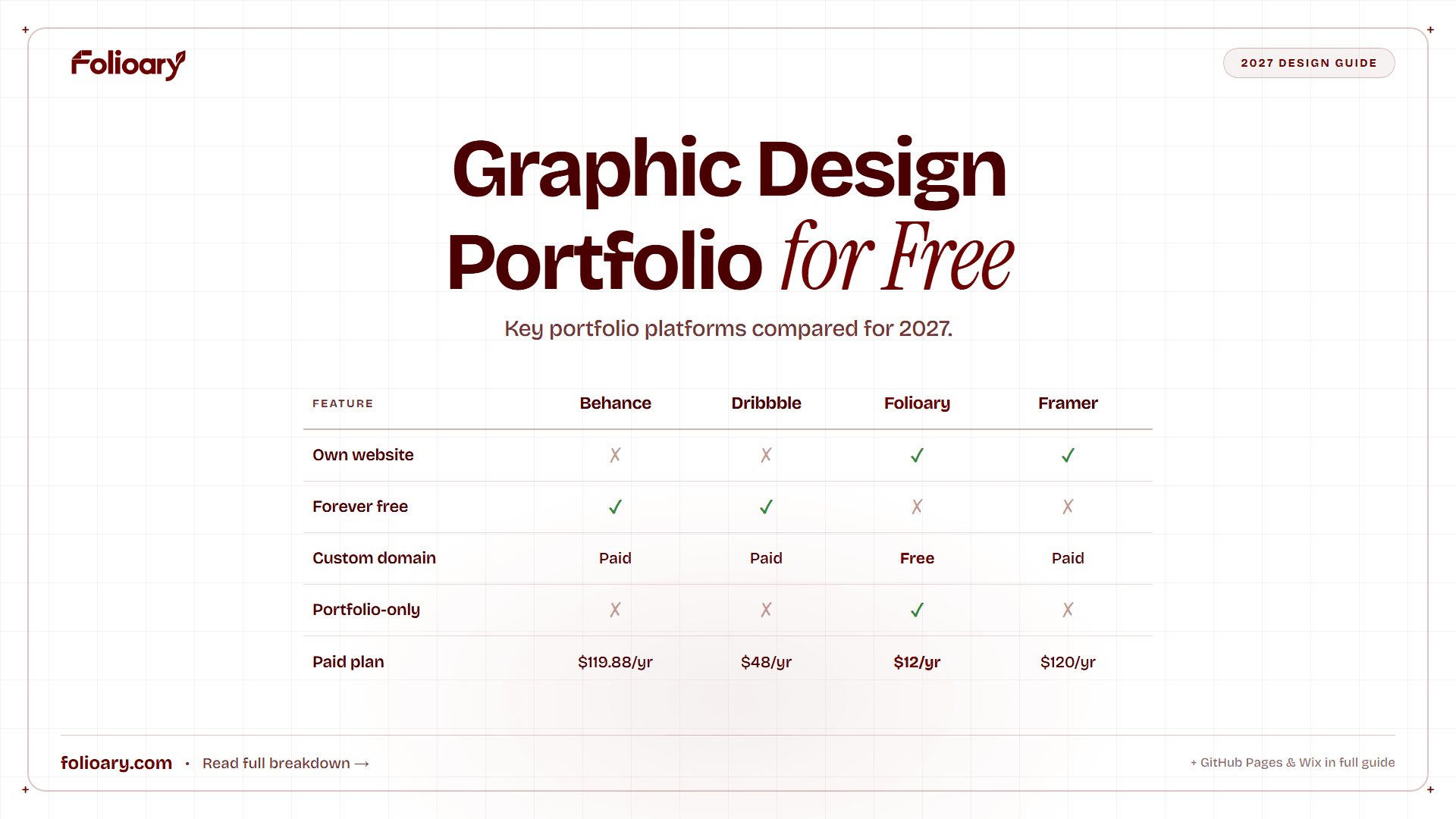
| Pro / paid plan | $119.88/yr | $48/yr | $0/yr | $12/yr | $120/yr | $204/yr |
| Custom domain support | Paid | Paid | Free | Free | Paid | Paid |
| Commercial use on free plan | ✓ | ✓ | ✓ | ✓ | ✗ | ✓ |
| No coding needed | ✓ | ✓ | ✗ | ✓ | ✓ | ✓ |
| Drag and drop editor | ✗ | ✗ | ✗ | ✓ | ✓ | ✓ |
| Full HTML & CSS control | ✗ | ✗ | ✓ | ✗ | ✗ | ✗ |
| Code export | ✗ | ✗ | ✓ | ✗ | ✗ | ✗ |
| Own website (not a social feed) | ✗ | ✗ | ✓ | ✓ | ✓ | ✓ |
| Ready-made templates | ✗ | ✗ | ✗ | ✓ | ✓ | ✓ |
| Built only for portfolios | ✗ | ✗ | ✗ | ✓ | ✗ | ✗ |
| Import from Figma | ✗ | ✗ | ✗ | ✗ | ✓ | ✓ |
| No-code animations & effects | ✗ | ✗ | ✗ | ✓ | ✓ | ✓ |
| Password-locked private projects | ✓ | ✗ | ✗ | ✓ | ✓ | ✓ |
| Built-in job board | ✓ | ✓ | ✗ | ✗ | ✗ | ✗ |
| Likes & comments on work | ✓ | ✓ | ✗ | ✗ | ✗ | ✗ |
| Sell design files or services | ✓ | ✓ | ✗ | ✗ | ✗ | ✓ |
| Built-in blog | ✗ | ✗ | ✓ | ✗ | ✓ | ✓ |
Which one to use
The right platform depends on whether you need people to find you, how much control you want over the design, and what you plan to spend. If your main goal is getting discovered, start with Behance, Dribbble, or both, because clients and art directors already browse those social sites every day and can find your work without a link from you. If you know HTML and CSS and want full control with no hosting fees, GitHub Pages is the only free option here that also lets you connect your own domain name, as long as you do not mind writing and updating the code yourself. If you do not code and want a clean portfolio online fast without fighting a heavy builder, Folioary is built specifically for that job. Its section-by-section layouts fit different kinds of graphic design, you get a 30-day live trial on yourname.folioary.com that only starts after you publish, and staying online afterward costs $12 for the whole year on the Starter plan, which is much cheaper than paying monthly on larger builders, with new templates and tools added every few weeks. If you want to design every pixel and animation yourself so the website itself shows off your layout skill, choose Framer and budget for the $10 a month Basic plan once clients start visiting. If you need a full business site with bookings or an online store alongside your work, Wix handles all of that in one place, either for free with Wix ads or from $17 a month without them. For most graphic designers, the most realistic setup is simple: post on one social network like Behance or Dribbble so strangers can find you, and share one clean portfolio site, like on Folioary, where your best projects sit in the exact order you want. A clear page that is actually online today will always help you more than a complicated site you never finish.

Written by Muhammad
Founder of Folioary. Full-Stack Web & Applied AI Developer passionate about building modern, scalable web applications and intelligent systems.